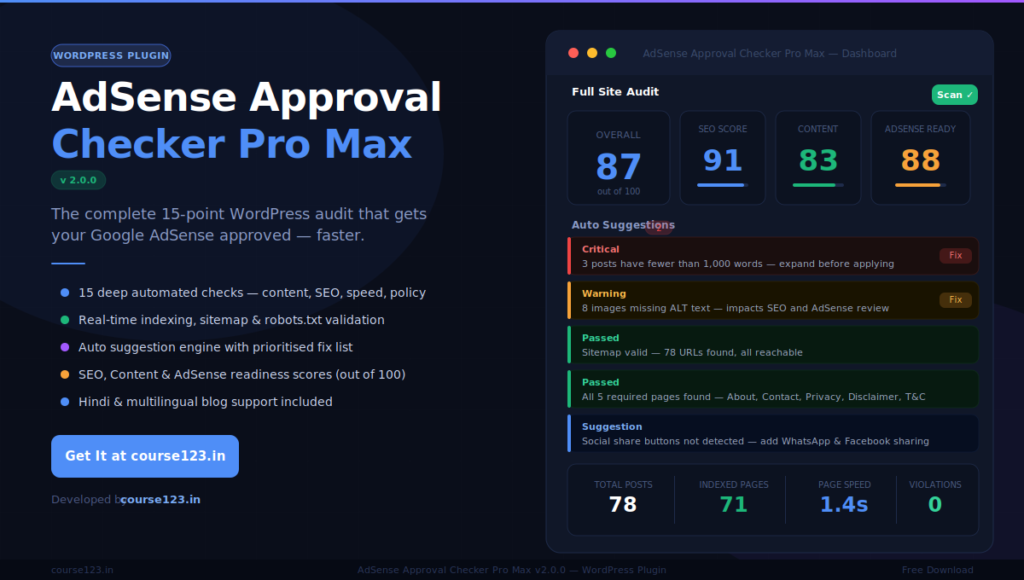
AdSense Approval Checker Pro Max — WordPress Plugin
💱 Shown in USD for reference. You will be charged in INR (₹) at checkout.
The #1 WordPress Plugin to Get Your Google AdSense Approved Faster Stop guessing why AdSense keeps rejecting your site. AdSense Approval Checker Pro Max runs a deep, 15-point audit of your entire WordPress website and tells you — in plain English — exactly what to fix, in what order, so you can get approved with […]
Product Description
The #1 WordPress Plugin to Get Your Google AdSense Approved Faster
Stop guessing why AdSense keeps rejecting your site. AdSense Approval Checker Pro Max runs a deep, 15-point audit of your entire WordPress website and tells you — in plain English — exactly what to fix, in what order, so you can get approved with confidence.
Why Most Bloggers Fail AdSense — And How This Plugin Fixes It
Getting AdSense approved in 2024–2025 is harder than ever. Google checks dozens of signals before approving a site: content quality, indexing status, page speed, required legal pages, SEO health, image optimisation, internal linking, and more. Most bloggers fail not because their content is bad — but because they miss small technical issues they never even knew existed.
This plugin scans everything automatically and gives you a clear action plan.
What the Plugin Checks (15 Deep Audits)
1. 📝 Content Word Count Audit
Checks every published post and page for word count. AdSense strongly prefers content of 1,000+ words. The plugin lists every post that falls below the threshold — sorted from shortest to longest — so you know exactly which ones to expand first.
2. 🌐 Google Indexing Status Check
Verifies how many of your pages are actually published and likely indexed by Google. AdSense wants to see 50+ pages indexed before approving a site. The plugin cross-checks your sitemap, counts published posts/pages from your database, estimates noindex-blocked pages, and even attempts a live Google site: search to give you a real-world indexed count.
3. 📅 Daily Posting Consistency Tracker
Shows a 6-month breakdown of how many posts you published each month, your daily average, and whether you’re hitting the recommended 1 post/day target. Google favours active, regularly updated blogs — this check tells you if your publishing frequency is strong enough.
4. 🗺️ Sitemap Deep Validation
Goes beyond just checking if a sitemap exists. The plugin:
- Detects all common sitemap locations (
/sitemap.xml,/sitemap_index.xml,/wp-sitemap.xml) - Validates the XML structure for errors
- Follows sitemap index files into child sitemaps
- Spot-checks 5 sitemap URLs for 404 errors
- Reports any malformed or unreachable entries
5. 🔎 Duplicate Content Detection
Scans all published posts for duplicate or near-duplicate content using a fingerprinting algorithm. Duplicate content is one of the top reasons AdSense gets rejected. The plugin flags exact duplicates and near-matches so you can rewrite or consolidate them.
6. 🔗 Internal Link Audit
Checks every post and page for internal links. Posts with fewer than 2 internal links are flagged. A strong internal linking structure improves crawlability, session duration, and AdSense performance — the plugin shows you which posts need more links.
7. 🌍 External Link & Broken Link Check
Scans external links across your site and actively checks up to 12 of them for broken URLs (404s, timeouts, server errors). Broken external links hurt UX and signal poor site maintenance to Google.
8. 🖼️ Image Optimisation Audit
- Detects all images missing ALT text across every post and page
- Flags images wider than 1,500px (layout risk)
- Scans your media library for files over 200 KB (Google PageSpeed threshold)
- Reports total images checked, ALT coverage percentage, and large file count
9. 📲 Social Share Button Detection
Checks whether your site has social sharing buttons — for Facebook, WhatsApp, Twitter/X, Pinterest, Telegram, and LinkedIn. Social sharing increases engagement signals, which AdSense reviewers look for. The plugin detects both popular sharing plugins and buttons coded directly into your theme.
10. 👤 Author Bio Coverage
Checks whether every published post has an author bio. Author bios build E-E-A-T (Experience, Expertise, Authoritativeness, Trustworthiness) — a major factor in Google’s quality assessment. The plugin shows bio coverage as a percentage across all posts.
11. 📄 Required Pages Check
Verifies the existence of all five pages that AdSense reviewers look for:
- About Us
- Contact Us
- Privacy Policy
- Disclaimer
- Terms & Conditions
Checks by slug, title, and WordPress’s built-in privacy policy setting. Also supports Hindi-language page slugs.
12. 🎨 Theme & UX Audit
Checks your site for:
- Mobile responsiveness (viewport meta tag)
- Navigation menu presence
- Footer section
- Breadcrumb navigation
AdSense reviewers manually browse sites. A clean, navigable, mobile-friendly design is non-negotiable.
13. ⚡ Page Speed Check
Measures your actual server response time, detects active caching plugins, CSS/JS minification tools, and CDN usage. Slow sites (4s+) are regularly rejected. The plugin gives specific plugin recommendations to fix speed issues.
14. 🔧 SEO Technical Audit
- Sitemap and robots.txt existence check
- robots.txt Googlebot block detection (critical — catches the deadly
Disallow: /mistake) - WordPress “Discourage Search Engines” setting check
- H1 tag usage percentage
- Meta title and meta description coverage
- Active SEO plugin detection (Rank Math, Yoast SEO, All in One SEO, The SEO Framework)
- Posts published in the last 30 days + daily average
15. ⚠️ AdSense Policy Violation Scan
Scans all post content for:
- Thin content (under 300 words)
- Adult or explicit keywords
- Gambling-related keywords
Flags posts that could trigger an AdSense policy rejection so you can fix or remove them before applying.
Scoring System — Know Exactly Where You Stand
After every scan, the plugin calculates three scores (each out of 100) and an Overall Score:
| Score | What It Measures |
|---|---|
| SEO Score | Technical SEO health — sitemap, robots.txt, linking, images, meta tags |
| Content Quality Score | Word count, originality, author bios, required pages, social sharing |
| AdSense Readiness Score | Combined readiness for AdSense approval |
| Overall Score | Average of all three — your single headline number |
Auto Suggestion Engine
Every scan produces a prioritised list of actionable suggestions — colour-coded by severity:
- 🔴 Red (Critical) — Must fix before applying. These will cause rejection.
- 🟡 Yellow (Warning) — Should fix to improve approval chances and SEO.
- 💡 Blue (Suggestion) — Recommended improvements for long-term growth.
Each suggestion includes the exact number of affected posts, the specific issue, and what to do about it.
Plugin Pages & Features
Dashboard
Your command centre. One-click full scan. Displays all four scores as animated gauges, key quick stats (total posts, indexed pages, sitemap status, page speed), required pages status, and the full suggestion list — all on a single screen.
Content Checks
Four-tab deep dive into:
- Word count per post (sorted lowest to highest)
- Internal links per post
- Duplicate content analysis
- Social sharing & author bio status
SEO Technical
Dedicated page for all technical SEO checks including the new sitemap deep validation, indexing status table, robots.txt health, WordPress visibility settings, and the 6-month posting consistency breakdown with monthly bar-chart data.
Images & Links
Tabbed view of:
- Every post’s image count and ALT text coverage
- Broken external links with HTTP status codes
- Best-practice guidance for image SEO
AdSense Policy
Full policy checklist, your AdSense Readiness score with plain-English verdict (“Ready”, “Getting there”, or “Not yet ready”), and a list of every policy violation detected with direct edit links.
Reports
Export your complete audit as a downloadable HTML report — or email it directly from within WordPress. Useful for agencies managing multiple client sites.
Help & Resources
Curated guide including:
- 12-step AdSense approval roadmap
- Top 8 recommended plugins
- Top 6 recommended themes
- Content quality tips
- 8 most common AdSense rejection reasons
- Step-by-step plugin usage guide
Key Bug Fixes in v2.0.0
This version resolves all known issues from earlier releases:
- PHP Fatal Error fixed —
preg_match(): Argument #2 must be of type string, array given— caused by unsafe header parsing. All HTTP responses now go through type-safe helper methods. - Word count fixed for Hindi/multilingual content —
str_word_count()only works in English. Now uses Unicode-aware whitespace splitting that works for any language. - JavaScript syntax error fixed — Broken quote nesting in inline JS was silently preventing the scan button from firing on sub-pages. All JS strings now use correct single/double quote pairing.
- SQL injection risk fixed — Required pages check now uses
$wpdb->prepare()correctly. - Misleading indexing count fixed — Sitemap URL count was being displayed as “indexed pages.” Now uses actual published post/page count from the database.
- robots.txt Disallow: / detection added — Catches the most dangerous misconfiguration in WordPress (blocking all of Googlebot).
- PHP execution timeout increased —
set_time_limit(300)added to the scan handler. Prevents premature timeouts on shared hosting. - AJAX timeout increased to 180 seconds — With a smart timeout message that tells users to refresh rather than panic.
- Duplicate content false positives reduced — Fingerprint extended from 500 to 800 characters + title, eliminating false matches on short posts.
- Image size threshold corrected — Reduced from 300 KB to 200 KB, aligned with Google PageSpeed Insights recommendations.
Who Is This Plugin For?
- Bloggers preparing to apply for Google AdSense for the first time
- Content creators who have been rejected and don’t know why
- Freelancers and agencies auditing client websites for AdSense readiness
- Hindi and multilingual bloggers — full Unicode support, Hindi page slug detection
- WordPress site owners who want a clear, actionable SEO health report
Technical Specifications
| Detail | Info |
|---|---|
| Plugin Name | AdSense Approval Checker Pro Max |
| Version | 2.0.0 |
| Requires WordPress | 5.5 or higher |
| Tested Up To | WordPress 6.5 |
| PHP Requirement | PHP 7.4 or higher |
| Language | English |
| Developer | course123.in |
| Plugin Type | Admin Tool / SEO Audit |
| Database Usage | Stores scan results in wp_options (auto-cleared on uninstall) |
| External Requests | Makes HTTP requests to your own site URLs only (for live checks) |
Frequently Asked Questions
How long does a scan take? Typically 30–90 seconds depending on the number of posts and your server speed. Shared hosting may take up to 2 minutes. The scan runs in the background — if it times out, wait 2 minutes and refresh; results are usually saved.
Does this plugin guarantee AdSense approval? No plugin can guarantee approval — that decision is made by Google. What this plugin does is eliminate every known technical and content reason for rejection, giving you the strongest possible application.
Will it work on a Hindi or multilingual blog? Yes. Word count uses Unicode-aware counting that works for Hindi, Urdu, and other non-Latin scripts. Required pages detection includes common Hindi slug names (e.g. hamare-bare-mein, sampark).
Does it slow down my website? No. The scan only runs when you manually click “Run Full Scan” in the WordPress admin. It has zero impact on your front-end for visitors.
Do I need to keep running scans? Run a scan whenever you make significant changes — after publishing new posts, installing new plugins, or changing your theme. There is no automatic scheduling; you are in control.
Is it compatible with Rank Math and Yoast SEO? Yes. The plugin reads meta data from Rank Math, Yoast SEO, All in One SEO, and The SEO Framework. It also detects when none of these are installed and recommends the best option.
What happens to my data? Scan results are stored in your own WordPress database (wp_options). No data is sent to any external server. The plugin makes outbound HTTP requests only to URLs on your own domain for live checks.