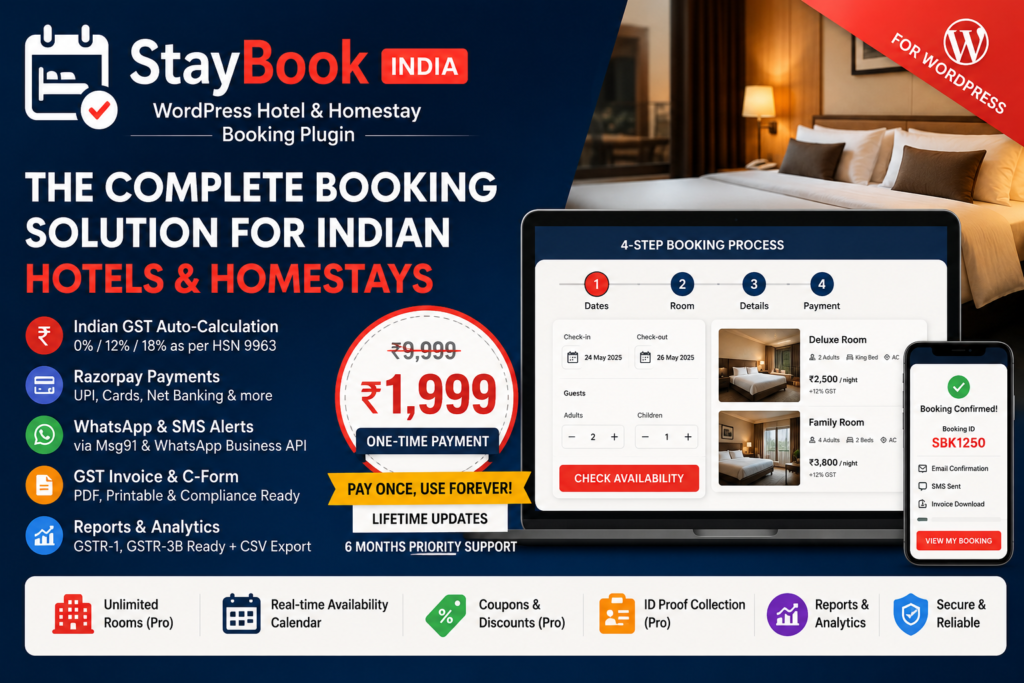
Product Description
Version: 1.0.3 | Requires: WordPress 5.6+, PHP 7.4+ | License: GPL-2.0 | Text Domain: staybook-india
₹9,999 ₹1,999 — One-Time Payment
No monthly fees. No recurring charges. Pay once and use forever with lifetime updates and 6 months of priority email support.
StayBook India is a complete booking plugin built specifically for small Indian hotels, homestays, guesthouses, and B&Bs. It handles everything from the guest-facing booking form to GST invoices, Razorpay payments, Msg91 SMS alerts, WhatsApp notifications, and printable C-Forms — all inside one WordPress plugin.
Free vs Pro
The free version is available on WordPress.org and supports one room with full booking functionality. The Pro version (₹1,999 one-time) unlocks unlimited rooms and all advanced features listed below.
Free version includes: 1 room listing, multi-step booking form, GST auto-calculation, email notifications to guest and hotel owner, Cash on Arrival payment, admin booking dashboard, 5 booking statuses, room CPT with meta boxes, [staybook_rooms] shortcode, [staybook_my_booking] shortcode, rate limiting (5 attempts/hour/IP), and “Powered by StayBook India” branding on the booking form.
Pro version adds: Unlimited rooms, Razorpay payment gateway, GST invoice PDF, SMS via Msg91, WhatsApp Business API, seasonal pricing rules, coupon/discount codes, ID proof collection (Aadhaar/PAN/Passport/Voter ID/Driving Licence), printable C-Form, [staybook_calendar] availability calendar shortcode, Reports & Analytics dashboard, CSV export, and license key system (1 domain per key).
Multi-Step Booking Form
The booking form uses a 4-step AJAX wizard — no page reloads at any point. Guests complete the booking entirely on one page.
Step 1 — Date Selection: Check-in and check-out date pickers powered by Flatpickr. Booked and blocked dates are automatically greyed out. Adults and children counter with +/− buttons.
Step 2 — Room Selection: After selecting dates, an AJAX call checks availability in real time. Available rooms appear as cards showing the room photo, type, bed type, max guests, amenities, price per night, and the applicable GST rate.
Step 3 — Guest Details: Guest full name, 10-digit Indian mobile number (validated with regex ^[6-9]\d{9}$), email address, special requests textarea. Pro version adds ID proof type selector and ID number field. Coupon code input with live Apply button (Pro only).
Step 4 — Payment: Shows full price summary — room charges, GST amount (with rate), discount if coupon applied, total amount, advance to pay now, and balance due on arrival. Two payment options: Cash on Arrival (free and Pro) and Razorpay advance payment (Pro only).
Step 5 — Confirmation: Booking ID displayed. Email confirmation sent to guest and hotel owner. SMS sent to guest (Pro). PDF invoice download button appears (Pro). “Powered by StayBook India” shown on free version, hidden on Pro.
Indian GST Auto-Calculation
GST is automatically calculated based on the room tariff per night as per HSN code 9963 (Accommodation Services). The plugin applies the correct slab without any manual configuration per booking.
Below ₹1,000/night — Nil GST (0%). No tax applied. Total = Room charges only.
₹1,000 to ₹7,500/night — 12% GST. Split as CGST 6% + SGST 6% for intra-state supply.
Above ₹7,500/night — 18% GST. Split as CGST 9% + SGST 9% for intra-state supply.
GST is calculated on the declared tariff per night entered in the room settings, not on the discounted or total amount. The GST invoice includes hotel GSTIN, guest details, HSN 9963, taxable value, CGST and SGST amounts separately, total GST, total invoice amount, advance paid, and balance due on arrival. The quarterly GST summary report in the Reports tab is formatted for direct use in GSTR-1 and GSTR-3B filing.
Razorpay Payment Gateway (Pro)
Razorpay is integrated for collecting advance payments. Guests can pay via UPI, debit card, credit card, net banking, or wallets — whichever Razorpay supports for their account.
Advance percentage: Set in Settings → Payment. Default is 30%. The remaining balance is collected from the guest at check-in.
Security: Every payment is verified using HMAC-SHA256 signature check. The Razorpay response is never trusted without cryptographic verification. The Razorpay Key Secret is stored in the database with AES-256-CBC encryption using a site-specific key generated on activation.
Webhook support: A webhook endpoint is registered at admin-ajax.php?action=staybook_razorpay_webhook. On receiving a payment.captured event, the booking status is automatically updated to Confirmed and payment status to Advance Paid.
Payment statuses tracked: Pending, Advance Paid, Fully Paid, Refunded.
Room Management
Rooms are managed as a Custom Post Type called staybook_room. The post title becomes the room name shown to guests. Each room has the following fields managed via meta boxes in the WordPress admin:
Room Type: AC, Non-AC, Deluxe, Suite, or Dormitory.
Bed Type: Single, Double, Triple, King, Queen, or Bunk.
Max Guests: Maximum number of adults and children combined. Rooms that cannot accommodate the searched guest count are automatically excluded from availability results.
Price per Night (₹): The base price used for GST calculation and booking total. A live GST slab preview is shown below the field in the admin.
Floor Number: Optional field for properties with multiple floors.
Amenities: Checkbox list — WiFi, TV, AC, Geyser, Parking, Breakfast, Room Service, Laundry.
Photo Gallery: Multiple photos uploaded via the WordPress media uploader. The first photo is used as the cover image on room cards in the booking form and [staybook_rooms] shortcode.
Availability Calendar: A mini calendar in the admin meta box shows the current month’s availability. Admin can click individual dates to block them for maintenance or owner use. Booked dates (blocked by guest reservations) are shown in red and cannot be unblocked from here.
Disable Booking: A checkbox toggle to temporarily stop all new online bookings for that specific room without deleting it.
Free plan limit: Only 1 published room allowed. Attempting to publish a second room reverts it to draft and shows an upgrade notice in the admin.
Admin Booking Dashboard
The main StayBook admin menu appears in the WordPress left sidebar under a calendar icon. It contains five sections:
Dashboard
Shows today’s check-in count, today’s check-out count, total pending bookings, total confirmed bookings, and number of active rooms — all as stat cards at the top. Below that is a table of the 5 most recent bookings and a shortcode reference table.
Bookings
A paginated list of all bookings (20 per page) with filters for booking status, room, date from, and date to. Each row shows: Booking ID, guest name and phone, room name, check-in date, check-out date, nights, total amount, payment status, and booking status. An inline dropdown on each row lets the admin change the booking status instantly via AJAX without leaving the page. Clicking “View” opens the full booking detail page showing the complete GST breakdown, guest ID proof details (Pro), payment history, Razorpay payment ID (Pro), and a status updater. The “Delete” button unblocks the dates automatically before deleting. “Download GST Invoice” and “Print C-Form” buttons appear on the detail page (Pro only). A “+ Add Manual Booking” button is available for walk-in guests. An “Export CSV” button exports all filtered bookings as a UTF-8 CSV file with BOM for Excel compatibility (Pro only).
Rooms
Links directly to the WordPress post list filtered to the staybook_room post type. Standard WordPress add/edit post interface with the custom meta boxes described above.
Reports (Pro)
A year selector and quarter selector at the top. Below: a Chart.js bar chart showing monthly revenue for the selected year (one bar per month). Below that: a quarterly GST summary table showing taxable value and total GST grouped by month and GST rate — formatted for GSTR-1/3B. An “Export CSV” button exports the current filtered bookings.
Settings
Six tabs described in the Settings section below. All settings saved via AJAX with a success/error message shown inline — no full page reload.
Notifications
Email (Free and Pro)
On every new booking, an HTML email is sent to the guest (if email provided) and a separate notification email to the hotel owner. Both use a branded template with the hotel logo (if uploaded in Settings → Email), hotel name, and booking details table. A “View Booking” button in the owner email links directly to the booking detail page in the admin.
A check-in reminder email is sent to guests one day before their check-in date, fired by a WP-Cron event scheduled daily.
SMS via Msg91 (Pro)
A booking confirmation SMS is sent immediately after a booking is created. A check-in reminder SMS is sent one day before check-in via the same daily WP-Cron job. Both templates are editable in Settings → SMS & WhatsApp. Available variables: {name}, {room}, {checkin}, {checkout}, {amount}, {booking_id}, {checkin_time}, {hotel}. All SMS are sent via Msg91’s transactional route (Route 4) with the Indian country code (+91) automatically prepended.
DLT requirement: As per TRAI regulations, sender ID and message templates must be registered on the DLT portal before use. The plugin sends SMS using the registered sender ID and template content entered in settings.
WhatsApp (Pro)
Auto WhatsApp message sent on booking confirmed via WhatsApp Business API (Meta/Facebook). Requires a WhatsApp Business account, approved message template, access token, and phone number ID — all entered in Settings → SMS & WhatsApp.
GST Invoice PDF (Pro)
A downloadable and printable GST Tax Invoice is generated for each booking. The invoice includes: hotel name, address, GSTIN, guest name, phone, email, ID proof details, room name, check-in and check-out dates, number of nights, rate per night, taxable amount, CGST and SGST amounts separately, discount applied (if coupon used with coupon code shown), total invoice amount, advance paid, balance due on arrival, payment method, and Razorpay payment ID (if applicable). The invoice number format is INV-000001 (zero-padded booking ID). A declaration statement and authorised signatory space are included at the bottom. An auto-print script triggers the browser print dialog when the invoice is opened in a new tab. The plugin supports DOMPDF for generating actual PDF files if the library is installed; otherwise it outputs a print-ready HTML page.
C-Form — Police Verification (Pro)
Indian hotels and guesthouses are legally required to maintain a guest register and C-Form for police verification. Clicking “Print C-Form” on any booking detail page opens a fully pre-filled printable form in a new tab with auto-print triggered. The form includes: hotel name and address, guest full name, father’s/spouse name field, mobile, email, permanent address field, nationality, ID proof type and number, stay details (room, check-in, check-out, nights, adults, children), purpose of visit, coming from/going to city fields, payment summary, a declaration statement in English and Hindi, a guest signature space, and a hotel staff signature space. A photo affixing box is included in the top corner.
Availability Calendar Shortcode (Pro)
The shortcode [staybook_calendar room_id="5"] displays a monthly availability calendar for a specific room on any front-end page. Green dates are available and show the price per night on hover (with seasonal price override applied if a rule exists for that date). Red dates are booked. The calendar has previous/next month navigation arrows. The current month is shown by default. This shortcode requires the room_id attribute — the WordPress post ID of the room.
Seasonal Pricing (Pro)
Date-range pricing rules can be created per room with a start date, end date, price per night, label (e.g. “Peak Season”, “Summer Special”, “Weekend Rate”), and priority. When a guest searches for availability, the plugin checks if any seasonal rule applies to the check-in date and uses that price instead of the base room price. If multiple rules overlap, the one with the highest priority value wins.
Coupon System (Pro)
Admin can create coupon codes in the database with: code (uppercase, unique), discount type (flat amount or percentage), discount value, minimum nights required for the coupon to apply, expiry date, usage limit (0 = unlimited), and active/inactive toggle. Guests enter the coupon code in Step 3 of the booking form. The plugin validates the code via AJAX — checking if it exists, is active, has not expired, has not exceeded usage limit, and meets the minimum nights requirement. The discount is shown immediately on the price summary and deducted from the total before payment. The used_count is incremented in the database when the booking is finalised.
ID Proof Collection (Pro)
The booking form Step 3 shows two additional fields when Pro is active: ID Proof Type (dropdown: Aadhaar Card, PAN Card, Passport, Voter ID, Driving Licence) and ID Number (text field). These are stored in the booking record and visible in the admin booking detail page. They are also printed in the C-Form and included in the GST invoice.
Reports & Analytics (Pro)
Monthly Revenue Chart: A Chart.js bar chart showing total booking revenue for each month of the selected year. Only non-cancelled bookings are included. The Y-axis displays values in Indian Rupee format.
Today’s Activity: Dashboard widget showing today’s confirmed check-ins and today’s confirmed or checked-in check-outs.
GST Quarterly Summary: A table showing taxable value and total GST grouped by month and GST rate for the selected quarter. Designed for use in GSTR-1 and GSTR-3B filing.
CSV Export: Exports all bookings (with current filters applied) as a CSV file. Columns include: Booking ID, Guest Name, Phone, Email, Room, Check-in, Check-out, Nights, Adults, Children, Price/Night, GST Rate, GST Amount, Total, Advance Paid, Payment Method, Booking Status, Payment Status, Coupon Code, Discount, Created At. The file includes a UTF-8 BOM for correct display in Microsoft Excel.
Shortcodes
[staybook_booking] — The full multi-step booking wizard. Works on any WordPress page or post. Optional attribute room_id="5" pre-selects a specific room when the form loads.
[staybook_rooms] — Displays all published rooms as cards showing photo, room type badge, bed type, max guests, amenities tags, price per night with GST note, and a “Book Now” button linking to the booking form. Attributes: columns="3" (1–4 columns, default 3), limit="-1" (number of rooms to show, -1 = all).
[staybook_my_booking] — A lookup form where guests enter their Booking ID and 10-digit mobile number to view their booking status, room, check-in/check-out dates, nights, total amount, advance paid, booking status, and payment status.
[staybook_calendar room_id="5"] (Pro only) — Monthly availability calendar for a specific room. Requires the room_id attribute.
Settings — 6 Tabs
General: Hotel name, hotel address, hotel phone, hotel email, check-in time (default 12:00), check-out time (default 11:00). Currency is fixed to INR and cannot be changed.
Payment (Pro): Razorpay Key ID, Razorpay Key Secret (stored AES-256 encrypted — leave blank to keep existing), Razorpay Webhook Secret, Cash on Arrival enable/disable toggle, Advance payment percentage (default 30%).
GST (Pro): Hotel GSTIN number (15-character format), Enable/Disable GST globally toggle, Show CGST/SGST breakup on confirmation page toggle.
SMS & WhatsApp (Pro): Msg91 Auth Key, DLT Sender ID (max 6 characters), Confirmation SMS template (editable, with variable support), Reminder SMS template (editable), WhatsApp Access Token, WhatsApp Phone Number ID, WhatsApp Template Name.
Email: From Name, From Email, Email Header Logo (uploaded via WordPress media uploader).
License (Pro): License key input field, Activate button (calls remote license API), deactivation option. Status shown as Active or Inactive. One license key works on one WordPress domain. To transfer to a new domain, deactivate first.
Database — 4 Custom Tables
All tables are created using dbDelta() on plugin activation, which allows safe schema upgrades in future versions. All data is stored in your own WordPress database — nothing is sent to external servers.
wp_staybook_bookings: id, room_id, guest_name, guest_email, guest_phone, guest_id_type, guest_id_number, check_in_date, check_out_date, nights, adults, children, room_price_per_night, gst_rate, gst_amount, total_amount, advance_paid, payment_method, razorpay_order_id, razorpay_payment_id, booking_status, payment_status, special_requests, coupon_code, discount_amount, created_at, updated_at.
wp_staybook_room_availability: id, room_id, blocked_date, reason (booked / maintenance / owner_block). Unique index on (room_id, blocked_date).
wp_staybook_seasonal_pricing: id, room_id, start_date, end_date, price_per_night, label, priority.
wp_staybook_coupons: id, code (unique), discount_type, discount_value, min_nights, expiry_date, usage_limit, used_count, is_active.
Security
Nonce verification: Every AJAX call — both admin and public — is verified using check_ajax_referer() or wp_verify_nonce() before any processing happens. This prevents CSRF attacks.
Input sanitization: All user inputs are sanitized using WordPress functions — sanitize_text_field(), sanitize_email(), sanitize_textarea_field(), absint(), sanitize_key(). No raw user data is ever passed to the database.
Output escaping: All output is escaped using esc_html(), esc_attr(), esc_url(), or wp_kses_post(). No unescaped variable is ever echoed directly.
SQL injection prevention: Every database query uses $wpdb->prepare() with placeholders. No raw SQL string interpolation of user input anywhere in the codebase.
Rate limiting: Booking creation is limited to 5 attempts per IP address per hour using WordPress transients. A new booking attempt beyond this limit returns an error without processing.
AES-256 encryption: The Razorpay Key Secret is encrypted using AES-256-CBC with a 32-byte site-specific key generated and stored in wp_options on first activation. The key is never stored in plain text.
HMAC-SHA256 payment verification: After Razorpay payment, the plugin verifies the payment signature using hash_hmac('sha256', order_id . '|' . payment_id, key_secret) and compares with hash_equals() to prevent timing attacks. Bookings are only confirmed after this verification passes.
Capability checks: All admin pages and every admin AJAX handler check current_user_can('manage_options') before executing. Unauthorized requests return an error immediately.
Directory protection: An index.php file with “Silence is golden” is placed in all 12 plugin directories to prevent directory listing.
Technical Details
Plugin version: 1.0.3
PHP compatibility: 7.4, 8.0, 8.1, 8.2, 8.3. All PHP 8.0+ union return types, typed properties, and mixed type hints have been removed for maximum compatibility.
WordPress compatibility: 5.6 and above. Tested up to 6.5.
Architecture: OOP with singleton pattern for the main plugin class. Hook registration uses a Loader class pattern that collects all actions and filters before registering them with WordPress in a single pass. 32 PHP files total across includes, admin, public, templates, and assets directories.
Frontend assets: Flatpickr (4.6.13) for date pickers. Chart.js (4.4.0) for reports. Razorpay checkout.js loaded from Razorpay CDN (Pro only). All assets loaded only on pages containing a StayBook shortcode (detected via has_shortcode() and post meta scan for page builder compatibility).
WP-Cron: One daily cron event (staybook_daily_reminders) checks for bookings with check-in date = tomorrow and sends reminder emails and SMS.
Uninstall: uninstall.php drops all 4 custom tables, deletes all plugin options, clears all transients, and deletes all staybook_room posts and their meta on plugin deletion.
Hooks for developers: staybook_booking_created action fires after a new booking is saved. staybook_booking_status_changed action fires when admin changes a booking status. staybook_payment_verified action fires after Razorpay payment is verified. staybook_load_public_scripts filter controls whether assets load on a given page.
Pricing
Free: Available on WordPress.org. 1 room, basic booking form, Cash on Arrival, email notifications. “Powered by StayBook India” branding shown.
Pro — ₹1,999 one-time: Unlimited rooms, Razorpay, GST invoice, SMS, WhatsApp, seasonal pricing, coupons, ID proof, C-Form, availability calendar, reports, CSV export, license key (1 domain), branding removed, 6 months priority support, lifetime updates.
Pro + Setup Service — ₹4,999 one-time: Everything in Pro, plus developer installs and configures on your site, Razorpay account setup assistance, and a 30-minute training call.
CodeCanyon listing: $24 USD (approximately ₹1,999). Targets international buyers in Southeast Asia, Nepal, Sri Lanka, and similar markets with similar hotel industry needs.
StayBook India – WordPress Hotel Booking Plugin
Version: 1.0.3 | Requires: WordPress 5.6+, PHP 7.4+ | License: GPL-2.0 | Text Domain: staybook-india ₹9,999 ₹1,999 — One-Time Payment No monthly fees. No recurring charges. Pay once and use forever with lifetime updates and 6 months of priority email support. StayBook India is a complete booking plugin built specifically for small Indian hotels, homestays, guesthouses, and B&Bs. It handles everything from the […]